
If you’re a high school student in the United States getting ready for the SAT, you’ve probably heard the term Digital SAT quite a bit.
But what does “digital” actually mean? Is it easier than the old paper SAT? What device do you need? How does the adaptive format work? Can you use a calculator? What is Bluebook? And how should you prepare differently for a test taken on a computer?
These are common questions, especially for students taking the SAT for the first time.
The good news is that the Digital SAT is not something you need to be nervous about simply because it’s taken on a device. The test still measures familiar academic skills in Reading and Writing and Math. What has changed is the way the test is delivered, the length of the exam, and the adaptive structure.
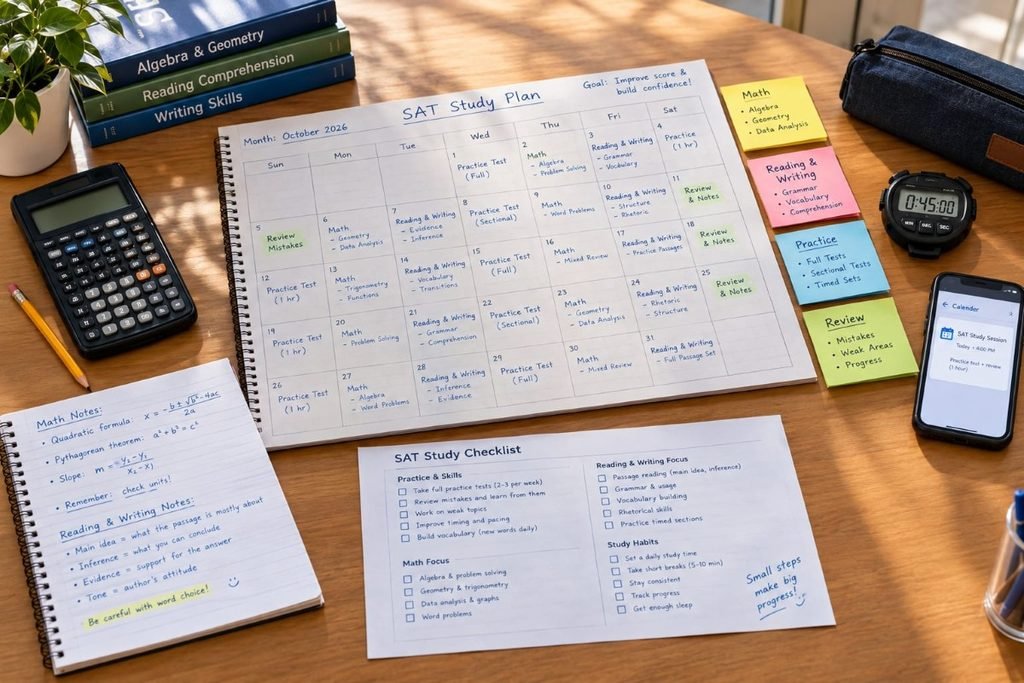
This guide explains how the Digital SAT works, what students should expect on test day, how to prepare, and which strategies can make the experience more manageable.
What Is the Digital SAT?
The Digital SAT is the current computer-based version of the SAT administered by College Board.
Instead of receiving a traditional paper test booklet, students take the exam using a testing device and the Bluebook testing application.
For most students in the U.S., the SAT is taken at a test center using an approved device. Students may generally use their own supported laptop or tablet, while College Board also has provisions for students who are approved to use a loaned testing device.
The Digital SAT still has two main sections:
- Reading and Writing
- Math
The total testing time is 2 hours and 14 minutes, not including the 10-minute break between sections. Reading and Writing takes 64 minutes, while Math takes 70 minutes.
So although the test is digital, the goal is still the same: measure skills that are relevant to college and career readiness.
How Is the Digital SAT Structured?
The Digital SAT has two sections, and each section is divided into two modules.
| Section | Questions | Time | Modules |
|---|---|---|---|
| Reading and Writing | 54 | 64 minutes | 2 |
| Math | 44 | 70 minutes | 2 |
| Total | 98 | 134 minutes | 4 |
There is a 10-minute break between Reading and Writing and Math.
One of the biggest differences from the old SAT is the adaptive format.
What Does Adaptive Testing Mean?
The SAT uses a multistage adaptive design.
You first complete the first module of a section. Your performance on that module helps determine the difficulty mix of the second module.
That means the second module isn’t simply an identical set of questions for everyone. It is tailored based on how you performed in the first module.
This can sound complicated at first, but you don’t need to calculate anything yourself.
Bluebook handles the test experience.
Your job is simply to concentrate on the questions in front of you.
Does the Digital SAT Have the Same Content as the Old SAT?
The Digital SAT still tests Reading and Writing and Math, but the experience is different from the former paper-and-pencil version.
Reading and Writing uses shorter passages, while Math includes questions from four major areas:
- Algebra
- Advanced Math
- Problem-Solving and Data Analysis
- Geometry and Trigonometry
College Board says the Math section contains questions from all four areas across the modules.
If you’re beginning your preparation, our SAT Math guide can help you understand the major Math topics and preparation strategies.
What Is Bluebook for the Digital SAT?
Bluebook is the application students use to take the Digital SAT.
Before test day, students can review the official Bluebook information to become familiar with the testing app and available tools.
It’s not simply a website that opens in a normal browser. Students prepare their testing device and use the Bluebook application for the actual exam.
The application includes several tools designed specifically for digital testing.
For example, students can:
- Move between questions within the current module
- Mark questions for review
- Cross out answer choices
- Use annotation tools on Reading and Writing questions
- Zoom in and out
- Use an embedded calculator during Math
- View the time remaining
These tools are worth practicing with before test day because you don’t want to learn how everything works while you’re taking the real exam.
What Device Do You Need for the Digital SAT?
This is one of the most important things to figure out before test day.
Depending on the testing situation, students may use an approved:
- Windows laptop
- Mac laptop
- iPad
- Windows tablet
- School-managed Chromebook
Your device must meet College Board’s current requirements and have the necessary Bluebook setup completed before the test.
Don’t wait until the night before the SAT to discover that your device needs an update or isn’t supported.
If you’re registered for the test, check your Bluebook setup instructions early.
College Board also has specific rules for students who need to borrow a testing device.
What Is the Digital SAT Test Day Experience Like?
The Digital SAT is still a supervised test-center experience.
You’ll check in, get seated, connect to the testing center’s Wi-Fi, and open Bluebook.
The proctor will provide the information needed to begin the test.
Once testing starts, Bluebook tracks the time for each module.
One important rule is that you can move between questions within the current module and review your answers, but once a module ends, you can’t go back to it.
That makes time management especially important.
You don’t want to spend several minutes on one question and then rush through the final questions of a module.
What Should You Bring to the Digital SAT?
Because the Digital SAT is taken on a device, your test-day checklist looks a little different from what students may remember from older SAT advice.
College Board currently recommends bringing your fully charged testing device with Bluebook installed and exam setup completed, an admission ticket, acceptable photo ID, something to write with for scratch work, and your College Board username and password.For the latest requirements, check the official SAT test-day checklist before your exam.
You can also bring an acceptable calculator for Math, although Bluebook provides an embedded calculator.
For a more complete preparation checklist, check the official College Board test-day requirements before your exam.
Can You Use a Calculator on the Digital SAT?
Yes.
The Digital SAT Math section includes an embedded calculator that students can use during the test.
You may also bring an acceptable calculator if you prefer using your own.
This is a major difference from some older SAT experiences because calculator use is available throughout the Math section rather than being limited to only certain portions.
Still, having access to a calculator doesn’t mean you should use it for every problem.
If a calculation is simple, doing it mentally may be faster.
For more complicated equations, graphs, or calculations, the calculator can save time and reduce arithmetic mistakes.
Should You Practice With Desmos Before the SAT?
If you plan to use the embedded calculator, it is smart to become comfortable with it before test day.
The goal isn’t to learn complicated calculator tricks just for the sake of it.
Instead, practice using technology to solve the kinds of problems that actually appear on the SAT.
For example, you may use graphing features to investigate:
- Linear equations
- Systems of equations
- Quadratic functions
- Intersections
- Zeros
- Graph behavior
The more familiar you are with the calculator environment, the less mental energy you’ll spend figuring out what button to press during the exam.
How Hard Is the Digital SAT?
The Digital SAT isn’t automatically easier just because it’s shorter or computer-based.
The difficulty depends on the questions you receive and your preparation.
The adaptive format can also make the experience feel different from a traditional test.
For example, if you perform strongly in the first module, the second module may contain a more difficult mix of questions.
That doesn’t mean you should panic if the second module suddenly feels harder.
In fact, a difficult second module can simply mean that you’re being presented with more challenging questions based on your performance in the first module.
Focus on the question you’re answering rather than trying to guess what your performance means.
How Should You Prepare for the Digital SAT?
A strong Digital SAT study plan has three parts:
Learn the content.
You need to understand the skills tested on Reading and Writing and Math.
Practice the format.
You need experience answering questions on a screen and working inside timed modules.
Review your mistakes.
You need to understand why you missed questions so you don’t repeat the same mistakes.
This third part is often overlooked.
Taking practice test after practice test without reviewing your errors isn’t an efficient way to improve.
Start With an Official Digital SAT Practice Test
Before creating a detailed study schedule, take a full-length practice test.
This gives you a starting point.
Pay attention not only to your score but also to the types of questions you missed.
For example, your Math mistakes might show that you struggle with:
- Linear equations
- Quadratics
- Percentages
- Data interpretation
- Geometry
Your Reading and Writing mistakes might reveal problems with:
- Main ideas
- Inferences
- Transitions
- Grammar
- Punctuation
- Vocabulary in context
Once you know your weak areas, your preparation becomes much more targeted.
You can also use our SAT Practice Test resource as part of your preparation.
How to Study for the Digital SAT at Home
You don’t necessarily need to spend hours every day preparing.
Consistency matters more.
A student with eight weeks available might benefit from studying for a manageable amount of time several days per week rather than trying to cram everything into a few weekends.
A simple weekly routine could look like this:
| Day | Focus |
|---|---|
| Monday | Math concepts |
| Tuesday | Reading and Writing |
| Wednesday | Practice questions |
| Thursday | Math practice |
| Friday | Reading and Writing practice |
| Saturday | Timed practice |
| Sunday | Review mistakes or rest |
Adjust the schedule based on your schoolwork, extracurricular activities, and test date.
The important thing is to create a plan you can actually follow.
Digital SAT Reading and Writing Preparation
The Reading and Writing section contains short passages and questions that test areas such as information and ideas, craft and structure, expression of ideas, and standard English conventions.
You don’t need to become an expert in every type of literature.
Instead, focus on understanding what each question is asking.
For grammar questions, learn the underlying rules.
For reading questions, practice finding evidence in the passage.
For vocabulary questions, use context instead of relying only on memorized definitions.
For transition questions, identify the relationship between the ideas before looking at the answer choices.
If you want a deeper breakdown, our Reading & Writing guide can fit naturally into your preparation.
Digital SAT Math Preparation
Math preparation should begin with the four major content areas:
- Algebra
- Advanced Math
- Problem-Solving and Data Analysis
- Geometry and Trigonometry
College Board currently lists these as the major Math content domains.
Don’t spend all your study time on the topics you already know.
Instead, use practice questions to identify gaps.
For example, if you consistently miss questions involving nonlinear equations, spend several study sessions working specifically on that skill.
Then return to mixed practice to see whether the improvement carries over.
How Much Time Should You Spend on Each Question?
There isn’t one perfect number of seconds that every student should spend on every question.
The official structure gives you 64 minutes for 54 Reading and Writing questions and 70 minutes for 44 Math questions.
That means you should develop a sense of pacing without treating every question like a strict stopwatch exercise.
Some questions will be quick.
Others will require more thought.
If you’re stuck, don’t let one question destroy your timing for the entire module.
Make your best decision and keep moving.
Digital SAT Registration
Before you can take the SAT, you’ll need to register for an available test date.
It’s worth planning ahead because your preferred test date and test center may not always be available when you wait until the last minute.
You can review our SAT Registration 2026 guide for registration-related information.
You may also want to check SAT Test Dates 2026 when planning your preparation timeline.
The ideal study schedule depends heavily on how much time you have before your actual test.
What About Your College Board Account?
You’ll use your College Board account for important SAT-related tasks.
If you’re a first-time SAT student, make sure your account information is accurate and that you know your login credentials.
Our College Board Login guide can help if you’re having trouble accessing your account.
It’s also a good idea to avoid creating multiple accounts unless College Board specifically instructs you to do so.
How Are Digital SAT Scores Calculated?
The Digital SAT continues to use the familiar 400–1600 total score scale.
The Reading and Writing section and Math section are each scored from 200 to 800.
Because the test is adaptive, your score isn’t simply a matter of counting the number of questions you answered correctly.
College Board’s scoring system considers the questions you answered correctly across the modules and the characteristics of those questions.
That’s another reason not to obsess over a simple “number correct = score” calculation.
Two students with the same number of correct answers may not necessarily receive identical section scores.
When Do Digital SAT Scores Come Out?
Your SAT score isn’t available immediately when you finish the test.
College Board releases scores according to the schedule for each SAT administration.
If you’re planning around college application deadlines, don’t wait until the last possible test date without checking when your score will become available.
Our SAT Score Release Dates 2026 guide can help you keep track of the expected schedule.
You can also review our SAT Score Release Time guide if you’re specifically wondering when scores may become available during the release day.
How Should You Think About Your Digital SAT Score?
Don’t judge your performance only by whether the number is “good” or “bad.”
Look at your score in context.
Your goals may depend on:
- The colleges you’re considering
- Whether those schools require or recommend SAT scores
- Your academic profile
- Your target score
- Your application strategy
You can use our SAT Score Chart to understand the score scale, and our What Is a Good SAT Score? guide for additional context.
If you want to understand how your score compares with other students, our SAT Score Percentiles guide can also help.
Common Digital SAT Mistakes to Avoid
Practicing Only on Paper
Paper practice can still help with concepts, but the real exam is digital.
Make sure some of your preparation happens in a realistic digital environment.
Ignoring Bluebook
Don’t wait until test day to discover how the application works.
Practice using the tools.
Spending Too Long on One Question
The Digital SAT is timed by module.
A difficult question isn’t worth sacrificing several easier questions later.
Assuming a Hard Second Module Means You Did Badly
Because the SAT is adaptive, a more difficult second module can be part of the testing design.
Keep answering the questions in front of you.
Not Reviewing Mistakes
Practice without review can become repetitive.
Your mistakes tell you what to study next.
Waiting Until the Last Week
Cramming may help you remember a few things, but it isn’t a reliable long-term SAT strategy.
Give yourself enough time to identify weaknesses and work on them.
Digital SAT vs. Old SAT
Students sometimes ask whether the Digital SAT is “the same SAT.”
The core purpose is still to assess skills relevant to college readiness, but the testing experience has changed significantly.
The Digital SAT is:
- Computer-based
- Shorter than the former SAT
- Divided into adaptive modules
- Taken using Bluebook
- Equipped with digital testing tools
- Designed around shorter Reading and Writing passages
- Available with an embedded calculator for Math
The change to digital testing doesn’t mean students can ignore the fundamentals.
You still need strong reading, writing, math, reasoning, and time-management skills.
Is the Digital SAT Better for Students?
There isn’t a single answer for every student.
Some students may prefer digital testing because they like working on a computer and appreciate tools such as the embedded calculator, annotation, and cross-out features.
Others may need time to become comfortable reading and solving problems on a screen.
The best approach is to practice in the same general environment you’ll use on test day.
That way, the format itself becomes familiar rather than another source of stress.
A Simple Digital SAT Preparation Checklist
Before test day, make sure you have:
- Registered for the correct SAT date
- Confirmed your test center information
- Installed and prepared Bluebook
- Completed the required exam setup
- Checked your testing device
- Charged your device
- Reviewed your admission ticket
- Confirmed your College Board login details
- Practiced with digital SAT questions
- Taken at least one realistic practice test
- Reviewed your mistakes
- Practiced using the calculator
- Planned how you’ll manage your time
College Board’s current test-day guidance should always be checked before your specific administration because procedures and technical requirements can change.
Frequently Asked Questions About the Digital SAT
Is the SAT completely digital now?
The current SAT is delivered digitally, with students using the Bluebook application on an approved testing device.
How long is the Digital SAT?
Standard testing time is 2 hours and 14 minutes, with 64 minutes for Reading and Writing and 70 minutes for Math, plus a 10-minute break between sections.
How many questions are on the Digital SAT?
There are 98 questions in total: 54 in Reading and Writing and 44 in Math.
Is the Digital SAT adaptive?
Yes. Each section has two modules, and the second module is tailored based on performance in the first module.
What is Bluebook?
Bluebook is the application used by students to take the Digital SAT and access digital testing tools and practice resources.
Can I use a calculator on the Digital SAT?
Yes. The Math section includes an embedded calculator, and students may also bring an acceptable calculator under College Board’s rules.
What device can I use for the Digital SAT?
Supported devices can include laptops and tablets that meet College Board’s current technical requirements. Students should check the current requirements before test day.
Is the Digital SAT easier than the paper SAT?
The format is different, but “digital” doesn’t automatically mean easier. The Digital SAT still measures college-readiness skills and uses an adaptive testing design.
How should I prepare for the Digital SAT?
Start with an official-style practice test, identify your weak areas, study those skills, and practice under timed digital conditions.
When should I start studying for the Digital SAT?
There isn’t one perfect starting point. Many students benefit from beginning several weeks or months before their test date so they have enough time to identify weaknesses and improve gradually.
Final Thoughts
The Digital SAT may look very different from the SAT your parents remember, but you don’t need to treat it as an entirely unfamiliar exam.
The most important thing is understanding how the current test works.
Know the two sections. Understand the adaptive modules. Practice with Bluebook. Get comfortable working on your testing device. Learn the calculator tools. And, most importantly, practice the actual skills the SAT measures.
Don’t spend all your preparation time trying to predict your score.
Instead, focus on the things you can control.
If you consistently miss certain Math problems, study those concepts.
If Reading and Writing questions take too long, practice identifying question types.
If you make careless mistakes, slow down enough to understand where they’re happening.
A good Digital SAT preparation plan isn’t about studying everything at once. It’s about finding the areas that need work and improving them one at a time.
By the time test day arrives, the goal is for the digital format to feel normal. You should be thinking about the questions—not wondering how Bluebook works.
That familiarity can make the entire testing experience feel much more manageable.



1 Comment
[…] you’re still getting familiar with the current format, our Digital SAT guide can help you understand what to […]