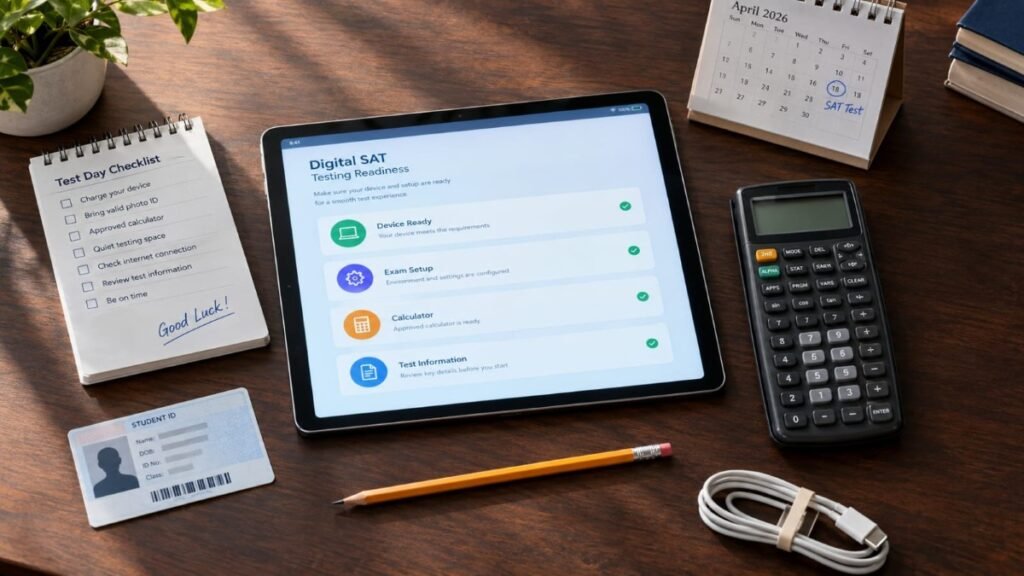
The Digital SAT isn’t a completely new test for 2026–27, but the testing experience has changed in several useful ways.
College Board has updated parts of Bluebook, introduced a new waitlist for U.S. students, changed some device requirements, and added new requirements for certain testing accommodations. These changes are mostly about how students access and take the SAT, rather than replacing the exam itself.
For most students, there’s no reason to rebuild an entire SAT study plan.
You just need to know what has changed and whether any of those changes affect you.
What Are the Latest Digital SAT Updates?
Beginning with fall 2026 testing, the main student-facing changes include:
- A new U.S.-only waitlist when preferred SAT dates or test centers are full
- A resizable embedded calculator in Bluebook
- Improved viewing for reference sheets, charts, graphs, and images
- A Windows 11 requirement for Bluebook
- Verified mode requirements for supported Chromebooks
- New equipment requirements for some students using text-to-speech or screen-reader accommodations
These changes are part of College Board’s 2026–27 SAT testing updates. You can also read our College Board Updates guide for broader coverage.
For the complete official information, see College Board’s 2026–27 SAT testing changes.
Is the Digital SAT Changing in 2026?
Yes, but the core exam hasn’t been replaced.
The SAT is still a digital test with Reading and Writing and Math sections. The major changes concern the technology, device compatibility, test-center access, and certain accommodations.
If you’ve already started preparing, you don’t need to throw away your existing materials. Just make sure you practice in a digital environment and understand the current requirements.
1. A New SAT Waitlist Is Available in the U.S.
Beginning with fall 2026 testing, eligible students taking the SAT in the United States can join a waitlist when their preferred test date or test center is full.
If a seat becomes available in the selected area, College Board may automatically place the student into that testing opportunity. The current waitlist fee is $0.
A waitlist is not a guaranteed seat.
If your SAT date matters because of a college deadline, continue checking other available dates and locations instead of relying entirely on the waitlist.
College Board currently describes this waitlist option as U.S. only.
For more information about testing locations, see our SAT Test Center Information guide.
2. Bluebook’s Calculator Can Be Resized
One of the most noticeable Bluebook changes is the ability to resize the built-in calculator in the Math section.
That can make it easier to use the calculator while keeping more of the question visible.
The update doesn’t change the Math itself.
You still need to know how to solve the problem, and you can still use an approved handheld calculator if you prefer one.
Practice with the digital calculator before test day so the interface feels familiar.
3. Reference Sheets and Visual Materials Are Easier to View
College Board has improved the way students view reference sheets, charts, graphs, and images in Bluebook.
Students can use features such as zoom and pan to inspect visual information more closely.
This is useful when a graph or image contains details that are difficult to read at its original size.
For that reason, digital practice should be part of your SAT preparation rather than relying entirely on printed material.
4. Windows 11 Is Required for Bluebook
For the 2026–27 testing year, College Board says Bluebook requires Windows 11.
If you’re planning to use a Windows laptop or tablet, check the operating system before test day.
A computer that works perfectly for school assignments may not necessarily meet the current SAT requirements.
Our SAT Requirements guide covers the broader device and testing requirements students should check.
5. Chromebook Requirements Are More Specific
Supported school-managed Chromebooks can still be used, but College Board requires verified mode for Bluebook.
Students may not have permission to change that setting themselves, so check with your school’s technology staff well before the SAT.
Personal Chromebooks aren’t supported testing devices.
Don’t wait until test morning to find out that the device you planned to use isn’t configured correctly.
6. Bluebook Setup and Device Lending Need Early Planning
Students should download Bluebook before the SAT and complete the required exam setup 1–5 days before test day.
The setup process downloads the test and generates the admission ticket.
If you don’t have an approved device, College Board may be able to lend one to eligible students. The request needs to be handled early; College Board currently says students requesting a loaned device must register for a test date at least 30 days away.
This is one part of SAT preparation you shouldn’t leave until the last minute.
7. Some Testing Accommodations Have New Requirements
Students using certain approved accommodations should review the current 2026–27 rules.
Beginning with fall 2026 testing, College Board says students approved for Text-to-Speech (Embedded) accommodations will generally take SAT Weekend at a test center unless another approved school-based accommodation applies.
Students approved for text-to-speech or screen-reader accommodations must also bring their own wired, non-Bluetooth headphones.
If you use an accommodation, follow the current instructions attached to your approval rather than assuming an earlier SAT setup still applies.
Does the Digital SAT Format Itself Change?
The Digital SAT remains a digital assessment delivered through Bluebook.
The 2026–27 updates don’t mean students have to learn an entirely different exam.
The more noticeable changes are in the tools and technical setup around the test.
Your preparation should still focus on:
- Learning the tested Math concepts
- Practicing Reading and Writing
- Working under realistic time limits
- Reviewing mistakes carefully
- Becoming comfortable testing on a screen
Technology should support your preparation, not replace it.
How Should You Prepare for the Updated Digital SAT?
A good approach combines academic preparation with digital familiarity.
Practice on Your Actual Testing Device
Whenever possible, practice on the same type of device you’ll use for the SAT.
You’ll become more comfortable with the screen size, keyboard, trackpad, calculator, and overall testing environment.
Learn the Bluebook Tools
Use practice sessions to become familiar with:
- The embedded calculator
- Reference sheets
- Zoom and pan
- Question navigation
- Marking questions for review
- Working with charts and graphs
You don’t need to use every feature all the time.
Use the tools that actually help you.
Keep Studying the Actual SAT Content
Don’t let technology take over your study schedule.
You still need to practice Math and Reading and Writing.
Take full-length tests.
Work through individual questions.
Review your mistakes.
Then use those results to decide what to study next.
Our SAT Study Plans guide can help you organize your preparation, while our SAT Practice Questions resource can help you target individual skills.
Do Digital SAT Updates Change the SAT Scoring System?
No.
The 2026–27 technology updates do not introduce a new SAT scoring scale.
The SAT remains on a 400–1600 total score scale, with separate Math and Reading and Writing section scores.
So if you’ve already been preparing for the SAT, you don’t need to learn a new scoring system because of these updates.
Do Digital SAT Updates Change Registration?
The basic registration process remains familiar.
Students still choose a test date and available testing location, but device readiness and test-center availability are worth checking before choosing a date.
If you’re ready to register, our SAT Registration 2026 guide explains the process.
If your preferred center is full, check other locations first and then see whether the U.S. waitlist applies to your situation.
Do Digital SAT Updates Affect Test Centers?
They can.
The new U.S. waitlist gives eligible students another option when preferred dates or centers are full.
Test-center information can also change, so students should check their latest information before the exam.
This is especially important if you’re traveling to a school you don’t normally attend.
Know the address, route, and arrival instructions before test morning.
Do Digital SAT Updates Change ID Requirements?
The technology updates don’t replace the standard ID rules.
If your testing situation requires an ID, you still need an acceptable physical photo ID that meets College Board’s current requirements.
A digital copy on your phone isn’t a substitute.
For the details, our SAT ID Requirements guide explains what students should check before test day.
How Do These Updates Affect College Applications?
Most of the 2026–27 changes are technical, but they can still affect your college-planning timeline.
For example, students who need a loaned device have to plan ahead, and students relying on a full test center may need to consider other locations or the U.S. waitlist.
Your SAT test date should fit the testing deadlines of the colleges you’re applying to.
Our SAT for College Admissions guide explains how testing fits into the larger application process.
What Should You Do If You’ve Already Registered?
You don’t need to change your registration simply because College Board announced new features.
Instead, check whether one of the changes applies to you.
Using Windows? Confirm that your computer runs Windows 11.
Using a Chromebook? Make sure it is a supported school-managed device with verified mode enabled.
Need a device? Check the loaned-device requirements early.
Using accommodations? Review your current accommodation instructions.
Preferred center full? Check other locations and the U.S. waitlist.
Already registered? Complete Bluebook exam setup 1–5 days before the test.
For most students, that’s all that’s necessary.
What Should You Do If You Haven’t Registered Yet?
Start with your college timeline.
Then choose a test date that gives you enough time to prepare and receive your score when you need it.
Before registering, check:
- Your preferred SAT date
- Test-center availability
- College application deadlines
- Device requirements
- Whether you need testing accommodations
Don’t delay registration just because you’re waiting for another update.
The best preparation is knowing the current requirements and then moving forward.
How to Stay Current With Digital SAT Updates

You don’t need to check College Board every day.
Instead, check for important updates at a few useful points.
When You Register
Review the current SAT dates, registration rules, and testing requirements.
Before You Start Your Final Weeks of Preparation
Make sure your device works and Bluebook is installed.
During the Week Before the Test
Complete exam setup and get your admission ticket.
The Night Before
Review your test-center information and any messages from College Board.
This is enough for most students to stay current without constantly searching for changes.
Digital SAT Updates Checklist
Device
- Approved testing device
- Windows 11 if using Windows
- Supported school-managed Chromebook if applicable
- Verified mode enabled when required
- Bluebook installed
- Device charged
Bluebook
- Exam setup completed
- Admission ticket available
- Digital tools practiced
- Calculator familiar
Testing
- Correct SAT date
- Correct test center
- Physical ID when required
- Calculator if using a handheld one
- Pencil or pen
College Planning
- Test date fits your application timeline
- Score-release timing works for your colleges
- You understand each college’s testing policy
Once these are handled, there’s no need to keep checking for every small technical announcement.
Focus on the test.
Frequently Asked Questions
What are the latest Digital SAT updates for 2026?
The major 2026–27 updates include a U.S.-only waitlist for full test dates or centers, a resizable embedded calculator, improved visual tools, Windows 11 requirements, Chromebook verified mode requirements, and changes affecting certain accommodations.
Is the Digital SAT changing in 2026?
Yes. Several parts of the testing experience are changing, but the updates do not represent a completely new SAT.
What changed in Bluebook?
The embedded calculator can be resized, and College Board has improved how reference sheets, charts, graphs, and images are viewed.
Is Windows 11 required for the Digital SAT?
Yes. College Board says Bluebook requires Windows 11 for the 2026–27 testing year.
Can I use a Chromebook for the Digital SAT?
Supported school-managed Chromebooks can be used when the required verified mode is enabled. Personal Chromebooks are not supported.
Can I take the Digital SAT on my phone?
No. A mobile phone isn’t an approved testing device for the SAT.
What is the new SAT waitlist?
Eligible students testing in the United States can join a waitlist when their preferred test date or center is full. A seat is not guaranteed.
Does the SAT waitlist cost money?
College Board currently lists the U.S. waitlist fee as $0.
Is the SAT waitlist available outside the United States?
The new waitlist option is currently described by College Board as U.S. only.
Do I need to complete Bluebook setup before the SAT?
Yes. Students should complete the required exam setup 1–5 days before the test and obtain their admission ticket.
Can College Board lend me a device?
College Board may be able to lend a device to eligible students who don’t have another approved option. Requests need to be made at least 30 days before test day.
Do Digital SAT updates change the SAT score scale?
No. The SAT remains on the 400–1600 scale.
Are the SAT questions changing because of these updates?
The 2026–27 changes mainly affect the technology, access, and testing experience rather than replacing the SAT with a completely different exam.
Do Digital SAT updates affect test-center availability?
They can. The new U.S. waitlist gives eligible students another option when preferred dates or centers are full.
Do students with accommodations have new requirements?
Some do. Students using certain text-to-speech or screen-reader accommodations must bring their own wired, non-Bluetooth headphones.
Should I change my SAT study plan because of the updates?
Most students don’t need to completely change their plan. Add some digital practice and make sure your device and Bluebook setup meet the current requirements.
Do Digital SAT updates change ID requirements?
No. Students who need identification must still meet the current physical-ID requirements.
Where can I check official Digital SAT updates?
Start with College Board’s official 2026–27 SAT testing changes and its official SAT Device Readiness guide.
Final Thoughts
The latest Digital SAT updates for 2026–27 are mostly practical changes to the testing experience.
For U.S. students, the new waitlist is important when preferred test dates or centers are full.
For students using personal or school devices, the updated Windows and Chromebook requirements deserve attention.
And for everyone taking the digital SAT, getting comfortable with Bluebook before test day is worth the effort.
You don’t need to turn these updates into another source of stress.
Check your device.
Learn the digital tools.
Complete Bluebook setup.
Understand the rules that apply to your situation.
Then get back to studying.
The technology should become part of your routine—not the thing you spend all your time worrying about.


4 Comments
[…] you’re still getting familiar with the digital format, our Digital SAT Updates guide covers the technology changes in more […]
[…] a broader explanation of recent digital changes, see our Digital SAT Updates […]
[…] For a broader explanation of the current format and recent changes, see our Digital SAT guide and Digital SAT Updates. […]
[…] can also read our Digital SAT Updates guide if you want to keep up with changes to the digital […]